Turn Customer Interviews Into Action Items With Exact Quotes

May 20, 2026
Every research project in Frank now has its own Action Items page and every item links straight back to the moment a customer said it!
Also in this release:
- Bulk download and delete for interviews
- Undo on archive and delete
- Emails now come from Frank
Interviews don't fail during the interview
You run 20 interviews. The transcripts land. Everyone means to read them. Then something more important happens, and the question of what to do with the interviews remains…
Now, Frank identifies Action Items in relevant conversations with your customers automatically.
It shows you how many people delivered this insight, and the exact moment in the conversation so that you can hear it for yourself!
No more rummaging through transcripts looking for breadcrumbs…
What to do with it
Every Action Item is referenced. Open any Action Item and you'll see the customer quote it came from, plus a link that jumps to that exact position in the transcript. This is the difference between "customers seem confused by onboarding" and being able to put three people's own words on screen in a meeting.
Set priority where you're already looking. Straight from the card, or from the detail panel if you want the fuller picture first. Triage a list of forty Action Items without a round trip on every one.
Filter down to the decision in front of you. Status, priority, date, or free-text search. If you're heading into a roadmap call, filter to high priority and open items and you have your agenda.
Keep each study's list separate. Action Items live inside the research project they came from, so your churn study's to-do list doesn't get tangled up with onboarding research. Each question you asked keeps its own answers.
Easier Interview Export
It’s now easy to download single interviews or batch them together.
Just select which interviews you want to download, and bulk download runs in the background rather than making you wait.
Frank packages up the transcripts and media and emails you a link when it's ready. Useful if you're handing a set of interviews to someone who doesn't work in Frank, or keeping your own copy alongside the rest of your research.
Getting started
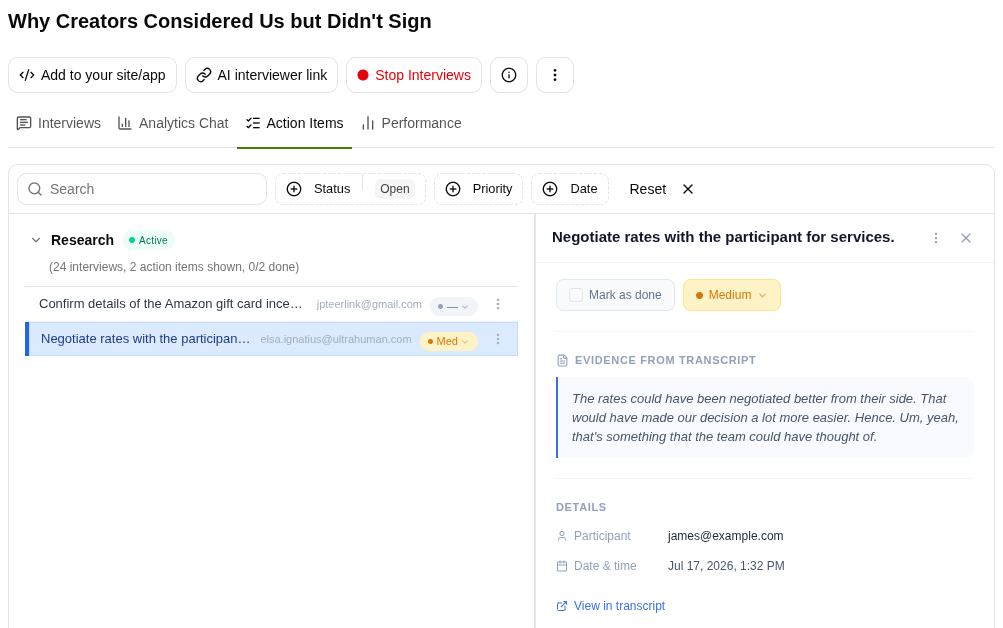
- Open a research project with completed interviews and go to the Action Items tab.
- Filter by Status, Priority or Date, or Search for the Action Item you’re interested in.
- Click on any Action Item to view the referenced moment in the interview and click through to hear it yourself!
Full setup steps are in the knowledge base.
Frank runs your customer interviews so you can get back to building.
Now it also tells you what to do about them — with the receipts attached. If you've been meaning to talk to your customers for two quarters and haven't found the time, that's the problem it exists to solve.